python实现图书管理系统
与智能家居系统集成,实现恒温系统的自动化管理。 #生活技巧# #居家生活技巧# #节省能源技巧# #智能恒温系统#
Python基于函数模块化设计的图书管理系统
函数模块,操作权限,内存调用
Python函数的模块化设计可以解决现实中的问题。该过程就是抽象的问题进行函数模块化设计。图书管理系统是现实生活最为简单的实例,下面我们将演示以下如何通过模块化的 程序设计 来实现。
首先,我们先来学习一下python函数模块:
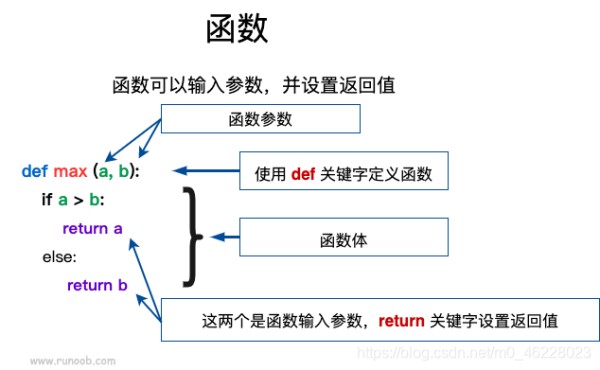
定义一个函数:
1.函数代码块以 def 关键词开头,后接函数标识符名称和圆括号 ()。
2.任何传入参数和自变量必须放在圆括号中间,圆括号之间可以用于定义参数。
3.函数的第一行语句可以选择性地使用文档 字符串 —用于存放函数说明。
4.函数内容以冒号 : 起始,并且缩进。
5. return [表达式] 结束函数,选择性地返回一个值给调用方,不带表达式的 return 相当于返回 None。
图书管理系统需要实现图书的增加,删除,修改,查阅,借阅,归还,个人信息修改。
用户注册函数:
def logon(): print("欢迎来到图书管理系统注册页面~") username = input("请输入用户名:") if len(username) < 6: print("用户名不能小于6个字符") else: email = input("请输入邮箱:") password = input("请输入密码:") if len(password) < 8: print("密码不能少于8位") else: rpassword = input("请确认密码:") if password == rpassword: print("注册成功!") # 函数调用,每追加一列数据都进行换行 每个数据之间都有空格 preserve_data(path, [username, ' ' + email, ' ' + password + '\n']) login_tips = input('是否登录?(yes/no)') if login_tips == 'yes': login() else: pass return True else: print("两次输入的密码不一致,请重新输入!") # 递归调用 logon() # 保存数据到文件 path = r'C:\Users\ASUS\Desktop\2021课程\python\User.txt' def preserve_data(file_path, data): # 将字符串转换为bytes,因为write写入的是字节流,不能是字符串 当为w时需要解码 # data = data.encode() # 打开文件,追加数据到文件 with open(file_path, 'a') as wstream: # 判断是否可写 if wstream.writable(): wstream.writelines(data) else: print("没有权限!")
python
12345678910111213141516171819202122232425262728293031323334353637383940414243用户登录函数:
# 用户登录 def login(): print("欢迎来到图书管理系统登录页面~") tips = input("是否已经注册?(yes/no)") if tips == 'yes': while True: username = input("输入用户名:") password = input("输入密码:") # 读取文件时可能会出现找不到文件的异常,因此使用try except try: # 读取文件中的内容 with open(path, 'rb') as stream: # 读取多行保存到列表中,列表中保存的是二进制,字节 result = stream.readlines() # print(result) # 列表推导式,循环遍历列表,将字节解码为字符串放在一个新列表uesr_list uesr_list = [i.decode() for i in result] # print(uesr_list) # 循环遍历列表,检查输入的用户名和密码是否在字符串中 for i in uesr_list: info = i.split(' ') print(info) if username == info[0] and password == info[2].rstrip('\r\n'): print("登录成功") operate(book_path, username) break else: print(info[0]) print(info[2]) raise Exception("用户名或密码错误,请重新输入!") except Exception as err: print(err) # 没有异常时执行else语句 else: break else: print("您还未注册,请先注册后再登录!") # 递归 logon()
python
12345678910111213141516171819202122232425262728293031323334353637383940查阅图书函数:
# 查询图书 def find_books(path): try: with open(path, 'r') as rstream: # readlines读到的内容是一个列表 container = rstream.readlines() # 通过列表推导式得到新的列表,即每个元素去掉后面的换行符号 new_container = [books_name.rstrip('\n') for books_name in container] for b_name in new_container: # 打印图书+《》 print("《{}》".format(b_name)) except Exception as err: print("错误原因:", err)
python
1234567891011121314添加图书函数:
# 添加图书 def add_book(b_path, username): # 添加前首先判断是否是管理员 permission(b_path, username) # 追加图书 不能是w ,否则会清空之前的内容 with open(b_path, 'a') as wstream: # 判断是否可写 if wstream.writable: msg = input("请输入书名:") try: # 添加书籍之前判断某本书是否已经添加 with open(b_path) as rstream: while True: line = rstream.readline() # 去掉右边的换行 line = line.rstrip('\n') # 当找到空行是如果还没有找到与输入的书名一致的时候,就添加输入的书名 if not line: book = '\n' + msg wstream.write(book) print("添加成功") break else: # 输入的图书和读到的行有一致的则提示不能重复添加 if line == msg: print("{}已添加,请不要重复添加哦~".format(msg)) break except Exception as err: print("错误原因:", err) else: print("没有权限")
python
12345678910111213141516171819202122232425262728293031修改图书函数:
# 修改图书 def update_book(b_path, username): permission(b_path, username) try: with open(b_path, 'r') as rstream: container = rstream.read() # 通过'\n'来分割字符串,返回结果是列表 container = container.split('\n') # print(container) # 删除前先展示有哪些图书 find_books(book_path) book_name = input("请输入需要修改的图书书名:") # 循环遍历修改书名 for i in range(len(container)): if book_name == container[i]: rbook_name = input("请输入修改后的图书书名:") container[i] = rbook_name + '\n' else: # 列表中的每个书名后面加换行符,用于写入文件时换行 container[i] = container[i] + '\n' # print(container) # 将书名更新后的内容以writelines写入文件中 writelines(可迭代) with open(b_path, 'w') as wwstream: wwstream.writelines(container) print("修改成功") except Exception as err: print("错误原因:", err)
python
123456789101112131415161718192021222324252627删除图书函数:
# 删除图书 def del_book(b_path, username): permission(path, username) try: with open(b_path, 'r') as rstream: container = rstream.read() # 通过'\n'来分割字符串,返回结果是列表 container = container.split('\n') # print(container) # 展示有哪些图书 find_books(book_path) book_name = input("请输入需要删除的图书书名:") # 循环遍历修改书名 for i in range(len(container) - 1): if book_name == container[i]: container.remove(container[i]) else: # 列表中的每个书名后面加换行符,用于写入文件时换行 container[i] = container[i] + '\n' # print(container) # 将书名删除后的内容以writelines写入文件中 writelines(可迭代) with open(b_path, 'w') as wwstream: wwstream.writelines(container) print("删除成功") except Exception as err: print("错误原因:", err)
python
12345678910111213141516171819202122232425262728以上函数需要有管理员操作权限;
借阅图书函数:
# 借书 def borrow_book(username): while True: print("图书列表:") find_books(book_path) borrow_books = input("请选择图书:") try: with open(r'C:\Users\ASUS\Desktop\2021课程\python\user_book.txt') as rstream: # 每次读取一行 lines = rstream.readline() lines = lines.rstrip('\n') # 将读到的内容通过空格分割保存到列表 lines = lines.split(' ') # 判断输入的书是否已被借走 if borrow_books not in lines: # print(lines) # 借书之前先判断该用户之前是否借过,如果借过,就在后面累加图书,用,分割图书 # for user_book in lines: if username in lines: with open(r'C:\Users\ASUS\Desktop\2021课程\python\user_book.txt', 'a') as wstream: # 判断之前是否借过某本书 if borrow_books not in lines: wstream.write(' {}'.format(borrow_books)) print("借书成功") break else: print("您已借过此书,请从新选择!") break else: # 将选择的图书与用户名一起保存到文件中 with open(r'C:\Users\ASUS\Desktop\2021课程\python\user_book.txt', 'a') as wstream: wstream.write('\n{} {}\n'.format(username, borrow_books)) print("借书成功") break else: print("<<{}>>已被用户{}借走,请重新选择~".format(borrow_books, lines[0])) except Exception as err: print("错误原因:", err)
python
123456789101112131415161718192021222324252627282930313233343536373839归还图书函数:
# 还书 def return_book(username): try: with open(r'C:\Users\ASUS\Desktop\2021课程\python\user_book.txt') as rstream: # print("{}您已借阅,未归还图书如下:".format(username)) # 读到的结果是列表 lines = rstream.readlines() # 遍历列表,将里面的元素再拆分为列表 for i in range(len(lines)): # 去掉换行 lines[i] = lines[i].rstrip('\n') lines[i] = lines[i].rstrip(' ') lines[i] = lines[i].split(' ') for ii in range(len(lines[i]) - 1): # 只打印登录用户借阅的图书 if username == lines[i][0]: print("{}您已借阅,未归还图书如下:".format(username)) print(lines[i][ii + 1]) msg = input("请选择你要归还的图书:") with open(r'C:\Users\ASUS\Desktop\2021课程\python\user_book.txt') as rstream: lines = rstream.readlines() for i in range(len(lines)): if username in lines[i] and msg in lines[i]: # 用空字符串替换msg,即表示删除归还的图书 lines[i] = lines[i].replace(msg, '') with open(r'C:\Users\ASUS\Desktop\2021课程\python\user_book.txt', 'w') as wstream: # 将变更后的列表再写入文件,只变更当前用户的图书信息 wstream.writelines(lines) print("归还成功!") break with open(r'C:\Users\ASUS\Desktop\2021课程\python\user_book.txt') as rstream: lines = rstream.readlines() for i in range(len(lines)): lines[i] = lines[i].rstrip('\n') lines[i] = lines[i].rstrip(' ') lines[i] = lines[i].split(' ') # print(type(lines[i])) for ii in range(len(lines[i])): # 图书归还成功后判断列表中只有用户名了,如果只有用户名则将用户名用空字符串代替 if username == lines[i][0] and len(lines[i]) == 1: lines[i][0] = lines[i][0].replace(lines[i][0], '') lines.append(lines[i][0]) # print(lines) str = '' for i in range(len(lines)): for ii in range(len(lines[i])): # 将嵌套列表中的元素取出来拼接成字符串 str += lines[i][ii] + ' ' str += '\n' # 遍历完毕删除之前列表里面嵌套的列表,追加字符串str lines.clear() lines.append(str) # print(lines) # 将更新后的列表写入文件 with open(r'C:\Users\ASUS\Desktop\2021课程\python\user_book.txt', 'w') as wstream: wstream.writelines(lines) else: print("您还没有借阅记录哦~") except Exception as err: print("错误原因:", err)
python
12345678910111213141516171819202122232425262728293031323334353637383940414243444546474849505152535455565758596061626364个人信息修改:
# 查看个人信息 def look_person_info(path, username): with open(path) as rstream: lines = rstream.readlines() # print(lines) for info in lines: # 分割成一个列表 info = info.split(' ') # print(info) if username in info: print("----个人信息----") print("用户名:", info[0]) print("邮箱:", info[1]) print("密码:", info[2].rstrip(' ')) # 修改个人信息 def update_password(path, username): tips = input("请选择操作:\n 1.修改邮箱\n 2.修改密码\n") # 修改邮箱 if tips == '1': new_email = '' line = [] try: with open(path) as rstream: while True: line = rstream.readline() if not line: break line = line.split(' ') # 去掉密码后面的换行符 line[2] = line[2].rstrip('\n') if username == line[0]: new_email = input("请输入新邮箱:") line[1] = new_email break except Exception as err: print(err) else: # 将新修改邮箱后的用户的所有信息追加到文件夹 with open(path, 'a') as wstream: for i in range(len(line)): if i == 0: # 遍历列表,第一个列表元素需要前面需要加换行,后面需要加空格与其他元素分割 line[i] = '\n' + line[i] + ' ' else: line[i] = line[i] + ' ' wstream.writelines(line) print("修改成功") # 删除修改邮箱之前用户的信息 with open(path) as rstream: # 读取多行 lines = rstream.readlines() i = 0 l = len(lines) while i < l: # 当前用户名在用户信息行且新的邮箱不在时就删除之前的用户信息,不会删除其他用户的信息 if username in lines[i] and new_email not in lines[i]: lines.remove(lines[i]) i += 1 l -= 1 # 删除旧邮箱对应的当前用户信息后,再将新邮箱对应的用户信息以及其他用户的信息从新写入到文件 with open(path, 'w') as wstream: wstream.writelines(lines) # 修改密码 elif tips == '2': new_password = '' line = [] try: with open(path) as rstream: while True: line = rstream.readline() if not line: break line = line.split(' ') # 去掉密码后面的换行符 line[2] = line[2].rstrip('\n') if username == line[0]: new_password = input("请输入新密码:") # 判断新密码与旧密码是否一致 if new_password == line[2]: # 抛出异常 raise Exception("新密码不能与旧密码相同哦~") else: line[2] = new_password break # 可以捕获到前面raise抛出的异常 except Exception as err: print(err) else: # 将新修改密码后的用户的所有信息追加到文件夹 with open(path, 'a') as wstream: for i in range(len(line)): if i == 0: # 遍历列表,第一个列表元素需要前面需要加换行,后面需要加空格与其他元素分割 line[i] = '\n' + line[i] + ' ' else: line[i] = line[i] + ' ' wstream.writelines(line) print("修改成功") # 删除修改密码之前用户的信息 with open(path) as rstream: # 读取多行 lines = rstream.readlines() i = 0 l = len(lines) while i < l: # 当前用户名在用户信息行且新的密码不在时就删除之前的用户信息,不会删除其他用户的信息 if username in lines[i] and new_password not in lines[i]: lines.remove(lines[i]) i += 1 l -= 1 # 删除旧密码对应的当前用户信息后,再将新密码对应的用户信息以及其他用户的信息从新写入到文件 with open(path, 'w') as wstream: wstream.writelines(lines)
python
123456789101112131415161718192021222324252627282930313233343536373839404142434445464748495051525354555657585960616263646566676869707172737475767778798081828384858687888990919293949596979899100101102103104105106107108109110111112113114115116117118119120普通用户信息:
# 个人信息 def person_information(path, username): tips = input("请选择操作:\n 1.查看个人信息\n 2.修改个人信息\n") if tips == '1': look_person_info(path, username) elif tips == '2': update_password(path, username)
python
12345678只有管理员可执行:
# 只有管理员才可以进行图书的增删改操作 user_path = r'C:\Users\ASUS\Desktop\2021课程\python\book.txt' def permission(user_path, username): try: with open(user_path) as rstream: while True: line = rstream.readline() # 读到空行跳出循环 if not line: break # 通过3个空格将字符串line分割为一个列表,存储三个值 line = line.split(' ') # 循环遍历列表,去掉列表中每个元素后面的换行,如果有就去掉,没有就不取掉 for i in range(len(line)): line[i] = line[i].rstrip('\n') # 判断是否管理员,如果是就可以进行添加操作 if username == 'adm': pass#管理员身份需要修改 else: print("只有管理员adm才可以进行该操作~") # 不是管理员将回到操作页面 operate(path, username) except Exception as err: print("错误原因:", err)
python
12345678910111213141516171819202122232425主操作界面:
# 图书增删改借还操作 book_path = r'C:\Users\ASUS\Desktop\2021课程\python\book.txt' # book_list = ['水浒传\n','红楼梦\n','廊桥遗梦'] def operate(b_path,username): if username == 'adm': while True: msg = input("请选择操作:\n 1.查询图书\n 2.添加图书\n 3.修改图书\n 4.删除图书\n 5.借书\n 6.归还图书\n 7.个人信息\n 8.退出登录\n") # 查询图书 if msg =='1': find_books(book_path) # 添加图书 elif msg =='2': add_book(b_path, username) # 修改图书 elif msg =='3': update_book(b_path, username) # 删除图书 elif msg =='4': del_book(b_path, username) # 借书 elif msg =='5': borrow_book(username) # 还书 elif msg =='6': return_book(username) #查看、修改个人信息 elif msg =='7': person_information(path, username) # 退出登录 elif msg =='8': msg = input("确定退出登录吗?(yes)") if msg == 'yes': break else: print("无效操作") else: while True: msg = input("请选择操作:\n 1.查询图书\n 2.借书\n 3.归还图书\n 4.个人信息\n 5.退出登录\n") # 查询图书 if msg =='1': find_books(book_path) # 借书 elif msg =='2': borrow_book(username) # 还书 elif msg =='3': return_book(username) #查看、修改个人信息 elif msg =='4': person_information(path, username) # 退出登录 elif msg =='5': msg = input("确定退出登录吗?(yes)") if msg == 'yes': break else: print("无效操作") login()
python
12345678910111213141516171819202122232425262728293031323334353637383940414243444546474849505152535455565758596061626364656667完整代码 :
#<<脚本语言大作业>> #->pyhton 设计图书管理系统<- # Author:油饼包烧麦 # # 用户注册 def logon(): print("欢迎来到图书管理系统注册页面~") username = input("请输入用户名:") if len(username) < 6: print("用户名不能小于6个字符") else: email = input("请输入邮箱:") password = input("请输入密码:") if len(password) < 8: print("密码不能少于8位") else: rpassword = input("请确认密码:") if password == rpassword: print("注册成功!") # 函数调用,每追加一列数据都进行换行 每个数据之间都有空格 preserve_data(path, [username, ' ' + email, ' ' + password + '\n']) login_tips = input('是否登录?(yes/no)') if login_tips == 'yes': login() else: pass return True else: print("两次输入的密码不一致,请重新输入!") # 递归调用 logon() # 保存数据到文件 path = r'C:\Users\ASUS\Desktop\2021课程\python\User.txt' def preserve_data(file_path, data): # 将字符串转换为bytes,因为write写入的是字节流,不能是字符串 当为w时需要解码 # data = data.encode() # 打开文件,追加数据到文件 with open(file_path, 'a') as wstream: # 判断是否可写 if wstream.writable(): wstream.writelines(data) else: print("没有权限!") # 用户登录 def login(): print("欢迎来到图书管理系统登录页面~") tips = input("是否已经注册?(yes/no)") if tips == 'yes': while True: username = input("输入用户名:") password = input("输入密码:") # 读取文件时可能会出现找不到文件的异常,因此使用try except try: # 读取文件中的内容 with open(path, 'rb') as stream: # 读取多行保存到列表中,列表中保存的是二进制,字节 result = stream.readlines() # print(result) # 列表推导式,循环遍历列表,将字节解码为字符串放在一个新列表uesr_list uesr_list = [i.decode() for i in result] # print(uesr_list) # 循环遍历列表,检查输入的用户名和密码是否在字符串中 for i in uesr_list: info = i.split(' ') print(info) if username == info[0] and password == info[2].rstrip('\r\n'): print("登录成功") operate(book_path, username) break else: print(info[0]) print(info[2]) raise Exception("用户名或密码错误,请重新输入!") except Exception as err: print(err) # 没有异常时执行else语句 else: break else: print("您还未注册,请先注册后再登录!") # 递归 logon() # 查询图书 def find_books(path): try: with open(path, 'r') as rstream: # readlines读到的内容是一个列表 container = rstream.readlines() # 通过列表推导式得到新的列表,即每个元素去掉后面的换行符号 new_container = [books_name.rstrip('\n') for books_name in container] for b_name in new_container: # 打印图书+《》 print("《{}》".format(b_name)) except Exception as err: print("错误原因:", err) # 添加图书 def add_book(b_path, username): # 添加前首先判断是否是管理员 permission(b_path, username) # 追加图书 不能是w ,否则会清空之前的内容 with open(b_path, 'a') as wstream: # 判断是否可写 if wstream.writable: msg = input("请输入书名:") try: # 添加书籍之前判断某本书是否已经添加 with open(b_path) as rstream: while True: line = rstream.readline() # 去掉右边的换行 line = line.rstrip('\n') # 当找到空行是如果还没有找到与输入的书名一致的时候,就添加输入的书名 if not line: book = '\n' + msg wstream.write(book) print("添加成功") break else: # 输入的图书和读到的行有一致的则提示不能重复添加 if line == msg: print("{}已添加,请不要重复添加哦~".format(msg)) break except Exception as err: print("错误原因:", err) else: print("没有权限") # 修改图书 def update_book(b_path, username): permission(b_path, username) try: with open(b_path, 'r') as rstream: container = rstream.read() # 通过'\n'来分割字符串,返回结果是列表 container = container.split('\n') # print(container) # 删除前先展示有哪些图书 find_books(book_path) book_name = input("请输入需要修改的图书书名:") # 循环遍历修改书名 for i in range(len(container)): if book_name == container[i]: rbook_name = input("请输入修改后的图书书名:") container[i] = rbook_name + '\n' else: # 列表中的每个书名后面加换行符,用于写入文件时换行 container[i] = container[i] + '\n' # print(container) # 将书名更新后的内容以writelines写入文件中 writelines(可迭代) with open(b_path, 'w') as wwstream: wwstream.writelines(container) print("修改成功") except Exception as err: print("错误原因:", err) # 删除图书 def del_book(b_path, username): permission(path, username) try: with open(b_path, 'r') as rstream: container = rstream.read() # 通过'\n'来分割字符串,返回结果是列表 container = container.split('\n') # print(container) # 展示有哪些图书 find_books(book_path) book_name = input("请输入需要删除的图书书名:") # 循环遍历修改书名 for i in range(len(container) - 1): if book_name == container[i]: container.remove(container[i]) else: # 列表中的每个书名后面加换行符,用于写入文件时换行 container[i] = container[i] + '\n' # print(container) # 将书名删除后的内容以writelines写入文件中 writelines(可迭代) with open(b_path, 'w') as wwstream: wwstream.writelines(container) print("删除成功") except Exception as err: print("错误原因:", err) # 借书 def borrow_book(username): while True: print("图书列表:") find_books(book_path) borrow_books = input("请选择图书:") try: with open(r'C:\Users\ASUS\Desktop\2021课程\python\user_book.txt') as rstream: # 每次读取一行 lines = rstream.readline() lines = lines.rstrip('\n') # 将读到的内容通过空格分割保存到列表 lines = lines.split(' ') # 判断输入的书是否已被借走 if borrow_books not in lines: # print(lines) # 借书之前先判断该用户之前是否借过,如果借过,就在后面累加图书,用,分割图书 # for user_book in lines: if username in lines: with open(r'C:\Users\ASUS\Desktop\2021课程\python\user_book.txt', 'a') as wstream: # 判断之前是否借过某本书 if borrow_books not in lines: wstream.write(' {}'.format(borrow_books)) print("借书成功") break else: print("您已借过此书,请从新选择!") break else: # 将选择的图书与用户名一起保存到文件中 with open(r'C:\Users\ASUS\Desktop\2021课程\python\user_book.txt', 'a') as wstream: wstream.write('\n{} {}\n'.format(username, borrow_books)) print("借书成功") break else: print("<<{}>>已被用户{}借走,请重新选择~".format(borrow_books, lines[0])) except Exception as err: print("错误原因:", err) # 还书 def return_book(username): try: with open(r'C:\Users\ASUS\Desktop\2021课程\python\user_book.txt') as rstream: # print("{}您已借阅,未归还图书如下:".format(username)) # 读到的结果是列表 lines = rstream.readlines() # 遍历列表,将里面的元素再拆分为列表 for i in range(len(lines)): # 去掉换行 lines[i] = lines[i].rstrip('\n') lines[i] = lines[i].rstrip(' ') lines[i] = lines[i].split(' ') for ii in range(len(lines[i]) - 1): # 只打印登录用户借阅的图书 if username == lines[i][0]: print("{}您已借阅,未归还图书如下:".format(username)) print(lines[i][ii + 1]) msg = input("请选择你要归还的图书:") with open(r'C:\Users\ASUS\Desktop\2021课程\python\user_book.txt') as rstream: lines = rstream.readlines() for i in range(len(lines)): if username in lines[i] and msg in lines[i]: # 用空字符串替换msg,即表示删除归还的图书 lines[i] = lines[i].replace(msg, '') with open(r'C:\Users\ASUS\Desktop\2021课程\python\user_book.txt', 'w') as wstream: # 将变更后的列表再写入文件,只变更当前用户的图书信息 wstream.writelines(lines) print("归还成功!") break with open(r'C:\Users\ASUS\Desktop\2021课程\python\user_book.txt') as rstream: lines = rstream.readlines() for i in range(len(lines)): lines[i] = lines[i].rstrip('\n') lines[i] = lines[i].rstrip(' ') lines[i] = lines[i].split(' ') # print(type(lines[i])) for ii in range(len(lines[i])): # 图书归还成功后判断列表中只有用户名了,如果只有用户名则将用户名用空字符串代替 if username == lines[i][0] and len(lines[i]) == 1: lines[i][0] = lines[i][0].replace(lines[i][0], '') lines.append(lines[i][0]) # print(lines) str = '' for i in range(len(lines)): for ii in range(len(lines[i])): # 将嵌套列表中的元素取出来拼接成字符串 str += lines[i][ii] + ' ' str += '\n' # 遍历完毕删除之前列表里面嵌套的列表,追加字符串str lines.clear() lines.append(str) # print(lines) # 将更新后的列表写入文件 with open(r'C:\Users\ASUS\Desktop\2021课程\python\user_book.txt', 'w') as wstream: wstream.writelines(lines) else: print("您还没有借阅记录哦~") except Exception as err: print("错误原因:", err) # 查看个人信息 def look_person_info(path, username): with open(path) as rstream: lines = rstream.readlines() # print(lines) for info in lines: # 分割成一个列表 info = info.split(' ') # print(info) if username in info: print("----个人信息----") print("用户名:", info[0]) print("邮箱:", info[1]) print("密码:", info[2].rstrip(' ')) # 修改个人信息 def update_password(path, username): tips = input("请选择操作:\n 1.修改邮箱\n 2.修改密码\n") # 修改邮箱 if tips == '1': new_email = '' line = [] try: with open(path) as rstream: while True: line = rstream.readline() if not line: break line = line.split(' ') # 去掉密码后面的换行符 line[2] = line[2].rstrip('\n') if username == line[0]: new_email = input("请输入新邮箱:") line[1] = new_email break except Exception as err: print(err) else: # 将新修改邮箱后的用户的所有信息追加到文件夹 with open(path, 'a') as wstream: for i in range(len(line)): if i == 0: # 遍历列表,第一个列表元素需要前面需要加换行,后面需要加空格与其他元素分割 line[i] = '\n' + line[i] + ' ' else: line[i] = line[i] + ' ' wstream.writelines(line) print("修改成功") # 删除修改邮箱之前用户的信息 with open(path) as rstream: # 读取多行 lines = rstream.readlines() i = 0 l = len(lines) while i < l: # 当前用户名在用户信息行且新的邮箱不在时就删除之前的用户信息,不会删除其他用户的信息 if username in lines[i] and new_email not in lines[i]: lines.remove(lines[i]) i += 1 l -= 1 # 删除旧邮箱对应的当前用户信息后,再将新邮箱对应的用户信息以及其他用户的信息从新写入到文件 with open(path, 'w') as wstream: wstream.writelines(lines) # 修改密码 elif tips == '2': new_password = '' line = [] try: with open(path) as rstream: while True: line = rstream.readline() if not line: break line = line.split(' ') # 去掉密码后面的换行符 line[2] = line[2].rstrip('\n') if username == line[0]: new_password = input("请输入新密码:") # 判断新密码与旧密码是否一致 if new_password == line[2]: # 抛出异常 raise Exception("新密码不能与旧密码相同哦~") else: line[2] = new_password break # 可以捕获到前面raise抛出的异常 except Exception as err: print(err) else: # 将新修改密码后的用户的所有信息追加到文件夹 with open(path, 'a') as wstream: for i in range(len(line)): if i == 0: # 遍历列表,第一个列表元素需要前面需要加换行,后面需要加空格与其他元素分割 line[i] = '\n' + line[i] + ' ' else: line[i] = line[i] + ' ' wstream.writelines(line) print("修改成功") # 删除修改密码之前用户的信息 with open(path) as rstream: # 读取多行 lines = rstream.readlines() i = 0 l = len(lines) while i < l: # 当 当前用户名在用户信息行且新的密码不在时就删除之前的用户信息,不会删除其他用户的信息 if username in lines[i] and new_password not in lines[i]: lines.remove(lines[i]) i += 1 l -= 1 # 删除旧密码对应的当前用户信息后,再将新密码对应的用户信息以及其他用户的信息从新写入到文件 with open(path, 'w') as wstream: wstream.writelines(lines) # 个人信息 def person_information(path, username): tips = input("请选择操作:\n 1.查看个人信息\n 2.修改个人信息\n") if tips == '1': look_person_info(path, username) elif tips == '2': update_password(path, username) # 只有管理员才可以进行图书的增删改操作 user_path = r'C:\Users\ASUS\Desktop\2021课程\python\book.txt' def permission(user_path, username): try: with open(user_path) as rstream: while True: line = rstream.readline() # 读到空行跳出循环 if not line: break # 通过3个空格将字符串line分割为一个列表,存储三个值 line = line.split(' ') # 循环遍历列表,去掉列表中每个元素后面的换行,如果有就去掉,没有就不取掉 for i in range(len(line)): line[i] = line[i].rstrip('\n') # 判断是否管理员,如果是就可以进行添加操作 if username == 'adm': pass else: print("只有管理adm才可以进行该操作~") # 不是管理员将回到操作页面 operate(path, username) except Exception as err: print("错误原因:", err) # 图书增删改借还操作 book_path = r'C:\Users\ASUS\Desktop\2021课程\python\book.txt' # book_list = ['水浒传\n','红楼梦\n','廊桥遗梦'] def operate(b_path,username): if username == 'adm': while True: msg = input("请选择操作:\n 1.查询图书\n 2.添加图书\n 3.修改图书\n 4.删除图书\n 5.借书\n 6.归还图书\n 7.个人信息\n 8.退出登录\n") # 查询图书 if msg =='1': find_books(book_path) # 添加图书 elif msg =='2': add_book(b_path, username) # 修改图书 elif msg =='3': update_book(b_path, username) # 删除图书 elif msg =='4': del_book(b_path, username) # 借书 elif msg =='5': borrow_book(username) # 还书 elif msg =='6': return_book(username) #查看、修改个人信息 elif msg =='7': person_information(path, username) # 退出登录 elif msg =='8': msg = input("确定退出登录吗?(yes)") if msg == 'yes': break else: print("无效操作") else: while True: msg = input("请选择操作:\n 1.查询图书\n 2.借书\n 3.归还图书\n 4.个人信息\n 5.退出登录\n") # 查询图书 if msg =='1': find_books(book_path) # 借书 elif msg =='2': borrow_book(username) # 还书 elif msg =='3': return_book(username) #查看、修改个人信息 elif msg =='4': person_information(path, username) # 退出登录 elif msg =='5': msg = input("确定退出登录吗?(yes)") if msg == 'yes': break else: print("无效操作") login()
python
123456789101112131415161718192021222324252627282930313233343536373839404142434445464748495051525354555657585960616263646566676869707172737475767778798081828384858687888990919293949596979899100101102103104105106107108109110111112113114115116117118119120121122123124125126127128129130131132133134135136137138139140141142143144145146147148149150151152153154155156157158159160161162163164165166167168169170171172173174175176177178179180181182183184185186187188189190191192193194195196197198199200201202203204205206207208209210211212213214215216217218219220221222223224225226227228229230231232233234235236237238239240241242243244245246247248249250251252253254255256257258259260261262263264265266267268269270271272273274275276277278279280281282283284285286287288289290291292293294295296297298299300301302303304305306307308309310311312313314315316317318319320321322323324325326327328329330331332333334335336337338339340341342343344345346347348349350351352353354355356357358359360361362363364365366367368369370371372373374375376377378379380381382383384385386387388389390391392393394395396397398399400401402403404405406407408409410411412413414415416417418419420421422423424425426427428429430431432433434435436437438439440441442443444445446447448449450451452453454455456457458459460461462463464465466467468469470471472473474475476477478479480481482483484485486487488489490491492493494495496497498499500501502503504505506507508509510511512513514515516517518519520521522523524525注:
1.文件读取路径各有差异,需要进行修改;
2.管理员身份需要在函数模块内修改,注册时且仅有一个。
3.建议运行环境使用pycharm.
以上为本次分享的全部内容感谢大家的支持,欢迎留言评论。
网址:python实现图书管理系统 https://www.yuejiaxmz.com/news/view/1451768
相关内容
【Python实用教学】——利用Python+Flask实现一个TODO任务管理系统网站学生信息管理系统 python实现(含全部代码)
利用Python+Flask实现一个TODO任务管理系统网站
Python+Django二手图书交易售卖系统=含卖家
Python实现个人记账系统:高效管理财务的编程实践
用python设计并实现一个简单的任务管理系统
python+flask计算机毕业设计基于的二手图书交易系统设计与实现(程序+开题+论文)
基于Python实现智能绿化管理系统计算机毕设
基于Python实现智能健身管理系统计算机毕业设计
基于Python+Flask实现一个TODO任务管理系统网站
随便看看
最新动态分享
- 国外厉害的生活达人!
- 生活垃圾焚烧炉渣属于什么类别_废物_利用_环保
- 标]=中国黄金集团石湖矿业有限公司固体废物综合利用项目招标公告
- 老物件:令人难以释怀的历史印记与文化积淀
- 南江县生活污泥等一般固体废物综合利用改扩建项目(重新报批)
- 江苏省烟草专卖局 市烟要闻 溧水:“志愿红”守护生态绿 用行动“碳”索美好
- 南京高校大学生旧物回收利用调研问卷
- 简单改造,秒变办公室腰靠“这届网友真是天才,废物利用绝了”
- 旧物别扔!10 个创意改造方案,环保又好看
- 旧物新生:创意改造与资源再利用.docx
热点动态分享
- 149653
- 59226
- 46816
- 43184
- 42475
- 31574
- 27417
- 25870
- 24133
- 20902