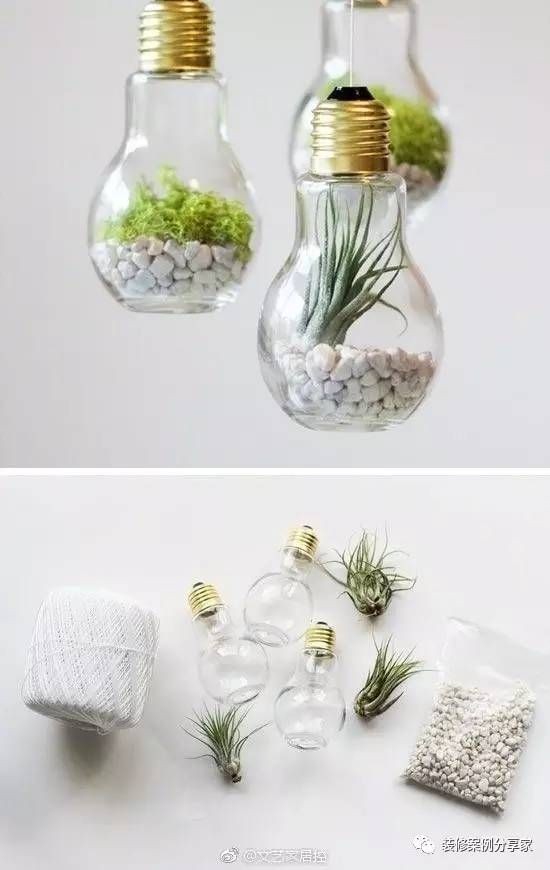
Flutter for OpenHarmony 植物养护 App:用数字花园培育你的绿色生活
《绿化植物养护管理软件使用指南》- 数字化管理植物的好帮手 #生活技巧# #园艺绿化建议# #绿化植物养护书籍#
Flutter for OpenHarmony 植物养护 App:用数字花园培育你的绿色生活
在快节奏的都市生活中,一盆绿植不仅是窗台的点缀,更是心灵的慰藉。然而,“忘记浇水” 或 “过度溺爱” 常常让我们的植物伙伴悄然枯萎。
加入社区 欢迎加入 开源鸿蒙跨平台开发者社区,获取最新资源与技术支持: 开源鸿蒙跨平台开发者社区完整效果
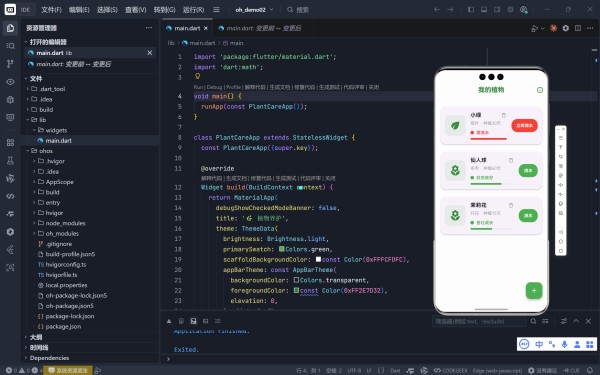

一、核心理念:让养护变得智能而有温度
该 App 围绕三个关键体验构建:
智能提醒:基于浇水间隔自动判断是否“口渴”;可视化成长:植物图标随生长阶段变化,浇水可能触发“成长动画”;情感反馈:健康状态文字(“茁壮成长”、“需浇水”)+ 进度条颜色变化,赋予植物“情绪”。技术不应冰冷,而应成为连接人与自然的桥梁。
二、数据 模型 :会“思考”的 Plant 类
class Plant { final String name; final String type; // 观叶/多肉/开花 final int waterInterval; // 浇水周期(天) final DateTime lastWatered; final DateTime plantedDate; final double growthStage; // 0.0(幼苗)→ 1.0(成熟) bool get needsWater { ... } // 是否需要浇水? String get healthStatus { ... } // 健康状态描述 IconData get plantIcon { ... } // 动态图标 }
dart
123456789101112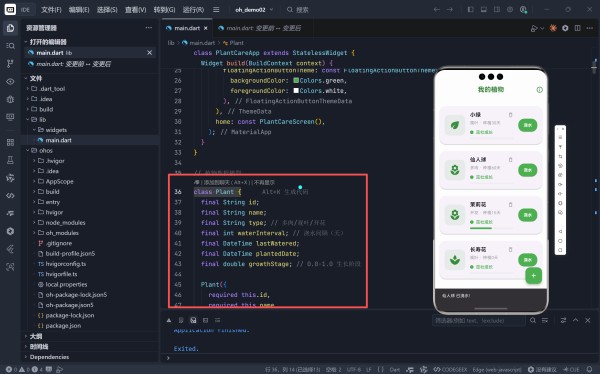
浇水 ≠ 机械操作:每次浇水有50%概率促进生长,模拟“精心照料带来回报”的自然法则。
三、交互亮点:让每一次点击都有意义
1. 动态植物图标 + 旋转动画AnimatedSwitcher( transitionBuilder: (child, animation) => RotationTransition(...), child: Icon(plant.plantIcon, key: ValueKey(plant.growthStage)), )
dart
1234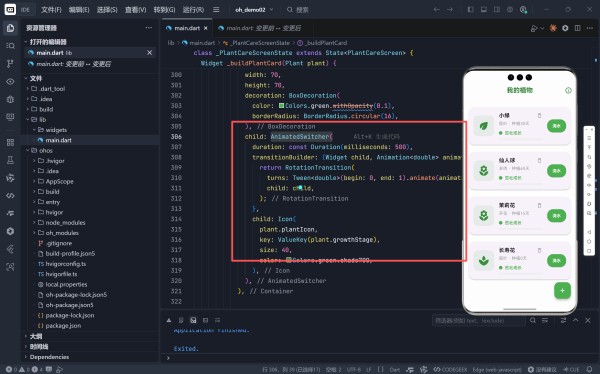
LinearProgressIndicator( value: daysSinceWater / waterInterval, color: needsWater ? Colors.red : Colors.green, )
dart
1234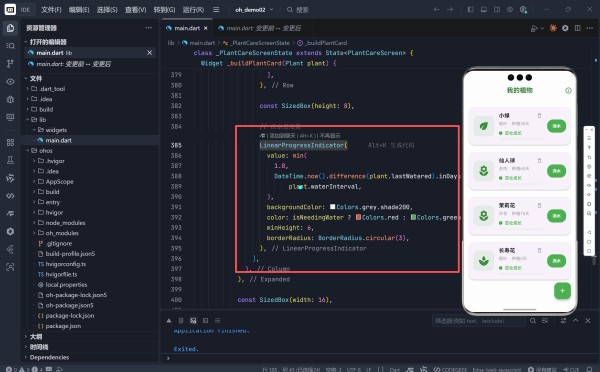
四、细节巧思:超越功能的情感化设计
✅ 随机生成新植物final plantNames = ['薄荷', '绿萝', '芦荟', ...]; final types = ['观叶', '多肉', '开花']; // 自动分配合理浇水间隔
dart
123 点击 FAB 按钮,随机添加一株真实存在的植物;自动匹配其类型对应的浇水频率(如多肉=14天,开花=2天);降低使用门槛,让用户立刻进入“园丁”角色。 ✅ 养护小贴士(Help Dialog) 点击 AppBar 的 info_outline 图标;弹出针对不同类型植物的养护建议: “观叶:避免阳光直射”“多肉:宁干勿湿”“开花:花期需磷钾肥” 底部特别提示:“进度条变红时,请及时浇水!”——强化核心交互逻辑。 ✅ 健康状态语义化 状态条件用户感受需浇水超过浇水间隔紧迫感,需立即行动状态良好距离下次浇水 > 50%安心,维持现状茁壮成长刚浇完水成就感,被认可文字比颜色更能传递情感——“茁壮成长”比“健康”更有生命力。
五、UI/UX 设计:清新治愈的植物美学
元素设计说明主色调Colors.green + 深绿 AppBar (#2E7D32) —— 自然、专业背景色#FCFDFC —— 接近纸张的米白,柔和不刺眼卡片圆角20 —— 比常规更大,模拟“花盆”轮廓空状态绿色描边圆形 + local_florist 图标,引导明确FAB 按钮绿底白加号,符合 Material 规范整体风格宁静、有机、无干扰,让用户专注于植物本身。
六、技术实现亮点
技术点应用说明AnimatedSwitcher + RotationTransition实现图标切换的流畅旋转动画ValueKey(plant.growthStage)确保动画在 growthStage 变化时触发min(1.0, progress)防止进度条溢出,保持 UI 稳定DateTime.now().millisecondsSinceEpoch生成唯一 ID,简单可靠copyWith 模式安全更新植物状态,避免直接修改七、未来扩展方向
当前版本已具备完整核心体验,可进一步拓展:
本地持久化:使用 hive 保存植物数据,重启不丢失;通知提醒:集成 flutter_local_notifications,缺水时推送;照片记录:允许用户上传植物照片,形成成长日记;品种百科:点击植物查看详细养护指南;成就系统:如“连续浇水30天”、“养活5种植物”等徽章;AR 预览:用 AR 将虚拟植物“放置”在真实桌面(arkit_flutter_plugin)。八、结语:在数字世界,种下一棵真实的树
这个植物养护 App 的真正价值,不在于它多么“智能”,而在于它唤醒了我们对生命的关注。
当你看到“小绿”的进度条变红,点击“立即浇水”,看着它图标旋转、状态变为“茁壮成长”——那一刻,你不是在操作一个 App,而是在履行一份对生命的承诺。
完整代码
import 'package:flutter/material.dart'; import 'dart:math'; void main() { runApp(const PlantCareApp()); } class PlantCareApp extends StatelessWidget { const PlantCareApp({super.key}); @override Widget build(BuildContext context) { return MaterialApp( debugShowCheckedModeBanner: false, title: ' 植物养护', theme: ThemeData( brightness: Brightness.light, primarySwatch: Colors.green, scaffoldBackgroundColor: const Color(0xFFFCFDFC), appBarTheme: const AppBarTheme( backgroundColor: Colors.transparent, foregroundColor: const Color(0xFF2E7D32), elevation: 0, ), floatingActionButtonTheme: const FloatingActionButtonThemeData( backgroundColor: Colors.green, foregroundColor: Colors.white, ), ), home: const PlantCareScreen(), ); } } // 植物数据模型 class Plant { final String id; final String name; final String type; // 多肉/观叶/开花 final int waterInterval; // 浇水间隔(天) final DateTime lastWatered; final DateTime plantedDate; final double growthStage; // 0.0-1.0 生长阶段 Plant({ required this.id, required this.name, required this.type, required this.waterInterval, required this.lastWatered, required this.plantedDate, this.growthStage = 0.0, }); // 计算是否需要浇水 bool get needsWater { final daysSinceWater = DateTime.now().difference(lastWatered).inDays; return daysSinceWater >= waterInterval; } // 计算健康状态 String get healthStatus { if (needsWater) return '需浇水'; final daysSinceWater = DateTime.now().difference(lastWatered).inDays; if (daysSinceWater <= waterInterval ~/ 2) return '茁壮成长'; return '状态良好'; } // 获取植物图标(根据类型和生长阶段) IconData get plantIcon { if (growthStage < 0.3) return Icons.spa; if (type == '开花') return Icons.local_florist; if (type == '多肉') return Icons.local_florist; return Icons.eco; } // 创建新实例(用于状态更新) Plant copyWith({ DateTime? lastWatered, double? growthStage, }) { return Plant( id: id, name: name, type: type, waterInterval: waterInterval, lastWatered: lastWatered ?? this.lastWatered, plantedDate: plantedDate, growthStage: growthStage ?? this.growthStage, ); } } class PlantCareScreen extends StatefulWidget { const PlantCareScreen({super.key}); @override State<PlantCareScreen> createState() => _PlantCareScreenState(); } class _PlantCareScreenState extends State<PlantCareScreen> { // 初始植物数据 List<Plant> _plants = [ Plant( id: '1', name: '小绿', type: '观叶', waterInterval: 3, lastWatered: DateTime.now().subtract(const Duration(days: 4)), plantedDate: DateTime.now().subtract(const Duration(days: 30)), growthStage: 0.7, ), Plant( id: '2', name: '仙人球', type: '多肉', waterInterval: 14, lastWatered: DateTime.now().subtract(const Duration(days: 10)), plantedDate: DateTime.now().subtract(const Duration(days: 60)), growthStage: 0.9, ), Plant( id: '3', name: '茉莉花', type: '开花', waterInterval: 2, lastWatered: DateTime.now().subtract(const Duration(days: 1)), plantedDate: DateTime.now().subtract(const Duration(days: 15)), growthStage: 0.4, ), ]; final Random _random = Random(); // 浇水操作 void _waterPlant(String plantId) { setState(() { _plants = _plants.map((plant) { if (plant.id == plantId) { // 更新浇水时间 final newPlant = plant.copyWith(lastWatered: DateTime.now()); // 随机促进生长(50%概率) if (_random.nextDouble() > 0.5 && newPlant.growthStage < 1.0) { final growthIncrement = 0.1 + _random.nextDouble() * 0.15; return newPlant.copyWith( growthStage: min(1.0, newPlant.growthStage + growthIncrement), ); } return newPlant; } return plant; }).toList(); }); // 显示反馈 final plant = _plants.firstWhere((p) => p.id == plantId); ScaffoldMessenger.of(context).showSnackBar( SnackBar( content: Text('${plant.name} 已浇水!${plant.growthStage >= 1.0 ? "已成熟!" : ""}'), duration: const Duration(seconds: 2), ), ); } // 添加新植物 void _addNewPlant() { final plantNames = ['薄荷', '绿萝', '芦荟', '吊兰', '虎皮兰', '长寿花', '蟹爪兰']; final types = ['观叶', '多肉', '开花']; final intervals = [2, 3, 5, 7, 10, 14]; final name = plantNames[_random.nextInt(plantNames.length)]; final type = types[_random.nextInt(types.length)]; final interval = intervals[_random.nextInt(intervals.length)]; final newPlant = Plant( id: DateTime.now().millisecondsSinceEpoch.toString(), name: name, type: type, waterInterval: interval, lastWatered: DateTime.now(), plantedDate: DateTime.now(), ); setState(() { _plants.add(newPlant); }); ScaffoldMessenger.of(context).showSnackBar( SnackBar(content: Text('欢迎新成员:$name')), ); } // 删除植物 void _deletePlant(String plantId) { final plantToDelete = _plants.firstWhere((p) => p.id == plantId); setState(() { _plants.removeWhere((p) => p.id == plantId); }); ScaffoldMessenger.of(context).showSnackBar( SnackBar( content: Text('${plantToDelete.name} 已移除'), action: SnackBarAction( label: '撤销', onPressed: () { setState(() { _plants.insert(0, plantToDelete); }); }, ), ), ); } @override Widget build(BuildContext context) { return Scaffold( appBar: AppBar( title: const Text( '我的植物', style: TextStyle(fontSize: 22, fontWeight: FontWeight.bold), ), centerTitle: true, actions: [ IconButton( icon: const Icon(Icons.info_outline, size: 24), onPressed: _showCareTips, ), ], ), body: _plants.isEmpty ? _buildEmptyState() : ListView.builder( padding: const EdgeInsets.only(top: 16, bottom: 90), itemCount: _plants.length, itemBuilder: (context, index) { return _buildPlantCard(_plants[index]); }, ), floatingActionButton: FloatingActionButton( onPressed: _addNewPlant, child: const Icon(Icons.add), tooltip: '添加新植物', ), ); } Widget _buildEmptyState() { return Center( child: Padding( padding: const EdgeInsets.all(32), child: Column( mainAxisAlignment: MainAxisAlignment.center, children: [ Container( padding: const EdgeInsets.all(24), decoration: BoxDecoration( color: Colors.green.withOpacity(0.1), shape: BoxShape.circle, ), child: const Icon( Icons.local_florist, size: 64, color: Colors.green, ), ), const SizedBox(height: 24), const Text( '还没有植物伙伴', style: TextStyle(fontSize: 20, fontWeight: FontWeight.bold), ), const SizedBox(height: 8), const Text( '点击下方按钮添加你的第一株植物', textAlign: TextAlign.center, style: TextStyle(color: Colors.grey, height: 1.5), ), ], ), ), ); } Widget _buildPlantCard(Plant plant) { final isNeedingWater = plant.needsWater; final healthColor = isNeedingWater ? Colors.red : Colors.green; return Card( margin: const EdgeInsets.symmetric(horizontal: 16, vertical: 12), elevation: 2, shape: RoundedRectangleBorder(borderRadius: BorderRadius.circular(20)), child: Padding( padding: const EdgeInsets.all(16), child: Row( children: [ // 植物图标(带动画) Container( width: 70, height: 70, decoration: BoxDecoration( color: Colors.green.withOpacity(0.1), borderRadius: BorderRadius.circular(16), ), child: AnimatedSwitcher( duration: const Duration(milliseconds: 500), transitionBuilder: (Widget child, Animation<double> animation) { return RotationTransition( turns: Tween<double>(begin: 0, end: 1).animate(animation), child: child, ); }, child: Icon( plant.plantIcon, key: ValueKey(plant.growthStage), size: 40, color: Colors.green.shade700, ), ), ), const SizedBox(width: 16), // 植物信息 Expanded( child: Column( crossAxisAlignment: CrossAxisAlignment.start, children: [ // 名称和类型 Row( children: [ Expanded( child: Text( plant.name, style: const TextStyle( fontSize: 18, fontWeight: FontWeight.bold, ), maxLines: 1, overflow: TextOverflow.ellipsis, ), ), GestureDetector( onTap: () => _deletePlant(plant.id), child: const Icon( Icons.delete_outline, size: 20, color: Colors.grey, ), ), ], ), const SizedBox(height: 4), Text( '${plant.type} · 种植${DateTime.now().difference(plant.plantedDate).inDays}天', style: const TextStyle(color: Colors.grey, fontSize: 14), ), const SizedBox(height: 12), // 健康状态 Row( children: [ Container( width: 12, height: 12, decoration: BoxDecoration( color: healthColor, shape: BoxShape.circle, ), ), const SizedBox(width: 8), Text( plant.healthStatus, style: TextStyle( color: healthColor, fontWeight: FontWeight.w600), ), ], ), const SizedBox(height: 8), // 浇水进度条 LinearProgressIndicator( value: min( 1.0, DateTime.now().difference(plant.lastWatered).inDays / plant.waterInterval, ), backgroundColor: Colors.grey.shade200, color: isNeedingWater ? Colors.red : Colors.green, minHeight: 6, borderRadius: BorderRadius.circular(3), ), ], ), ), const SizedBox(width: 16), // 浇水按钮 ElevatedButton( onPressed: () => _waterPlant(plant.id), style: ElevatedButton.styleFrom( backgroundColor: isNeedingWater ? Colors.red : Colors.green, shape: RoundedRectangleBorder( borderRadius: BorderRadius.circular(20)), padding: const EdgeInsets.symmetric(vertical: 12, horizontal: 16), ), child: Text( isNeedingWater ? '立即浇水' : '浇水', style: const TextStyle( color: Colors.white, fontWeight: FontWeight.bold), ), ), ], ), ), ); } void _showCareTips() { showDialog( context: context, builder: (context) => AlertDialog( title: const Text(' 养护小贴士'), content: SingleChildScrollView( child: Column( crossAxisAlignment: CrossAxisAlignment.start, children: const [ Text('• 观叶植物:保持土壤微湿,避免阳光直射'), SizedBox(height: 8), Text('• 多肉植物:宁干勿湿,充足光照'), SizedBox(height: 8), Text('• 开花植物:花期需充足水分和磷钾肥'), SizedBox(height: 16), Divider(), SizedBox(height: 8), Text( '浇水提示:当进度条变红时,请及时浇水!', style: TextStyle(color: Colors.red), ), ], ), ), actions: [ TextButton( onPressed: Navigator.of(context).pop, child: const Text('知道了'), ), ], ), ); } }
bash
123456789101112131415161718192021222324252627282930313233343536373839404142434445464748495051525354555657585960616263646566676869707172737475767778798081828384858687888990919293949596979899100101102103104105106107108109110111112113114115116117118119120121122123124125126127128129130131132133134135136137138139140141142143144145146147148149150151152153154155156157158159160161162163164165166167168169170171172173174175176177178179180181182183184185186187188189190191192193194195196197198199200201202203204205206207208209210211212213214215216217218219220221222223224225226227228229230231232233234235236237238239240241242243244245246247248249250251252253254255256257258259260261262263264265266267268269270271272273274275276277278279280281282283284285286287288289290291292293294295296297298299300301302303304305306307308309310311312313314315316317318319320321322323324325326327328329330331332333334335336337338339340341342343344345346347348349350351352353354355356357358359360361362363364365366367368369370371372373374375376377378379380381382383384385386387388389390391392393394395396397398399400401402403404405406407408409410411412413414415416417418419420421422423424425426427428429430431432433434435436437438439440441442443444445446447448449450451452453454455456457458网址:Flutter for OpenHarmony 植物养护 App:用数字花园培育你的绿色生活 https://www.yuejiaxmz.com/news/view/1453150
相关内容
家庭花园的绿色植物选择与养护.docx园林植物栽培与养护(第一期)
花园植物与室内绿植:开启你的绿色生活之旅!
打造绿色家园,花卉花园绿植物的种植艺术与养护指南
生态校园绿化植物养护中的病虫害绿色防控
建花园家庭 享绿色生活——荣西社区开展植物培育公益科普周活动
本市百家园艺驿站提供花草养护培训 引导绿色生活
园丁上门帮你养护绿植?花园生活想通过家庭用户打进B端市场
园艺联盟app:分享绿植养护的诀窍
园林植物栽培与养护【全本
随便看看
最新动态分享
- 健身会所毛巾清洗公司
- 你会去共享健身房锻炼吗?共享健身房走进社区,给上班族带来便利
- 彻夜攻坚终破局!吉隆口岸核心区救援通道已抢通,重型设备全面进场搜救,搜救工作全速提速
- 维密大秀中国模特合集 中国超模军团闪耀洛杉矶
- 露营草地清洁方案.docx
- 露营背包的深度清洁与保养方法.docx
- 露营用具清洗方案
- 小伙零下20度野外露营,寒冬呼啸而过,帐篷里竟然比空调房还温
- 露营救过的人命的血泪经验:野外急救包里没这些=玩命
- 野外求生技巧,野炊知识.doc
热点动态分享
- 150260
- 59839
- 47027
- 43251
- 42640
- 31645
- 27633
- 25920
- 24369
- 21318