Bridge Your Optical Modem in 10 Minutes
'Interview preparation',用'Can you tell me about your experience in...?'提问 #生活技巧# #职场沟通技巧# #商务英语口语#
> Goal: switch the optical modem from “router mode” to “bridge mode” and let the router handle dial-up
> Result: one less NAT layer, a more stable network, and full control from your router
Why bridge it? The short version
The problem with modem dial-up (double NAT)
Your device → Router (1st NAT) → ONT (2nd NAT) → Carrier
Drawbacks:
Traffic goes through two NAT translations, which costs efficiency The router's WAN port only gets a private address such as 192.168.1.x Network stability depends on the modem Some features simply do not work (port forwarding, DMZ, and so on)What improves after bridging
Your device → Router (1st NAT) → ONT (pass-through only) → Carrier
Benefits:
Only one NAT layer, so it is more efficient The router receives the WAN address assigned by your ISP directly A more stable network with lower latency The router's features all become usable Makes later tinkering easier (software routers, mesh networking, and so on)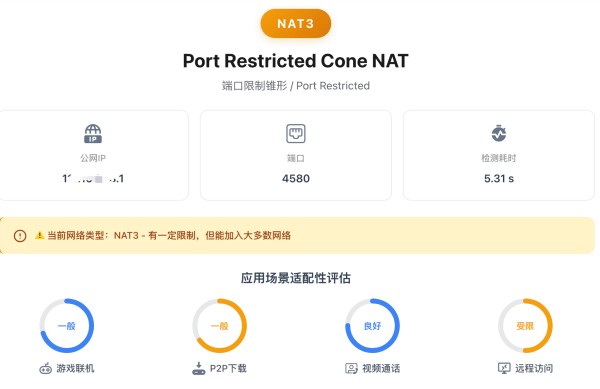
Preparation: get the modem's superadmin password
Method 1: just ask the installer (recommended)
Ask the technician when your broadband is installed Be friendly — offer them a drink You will usually get it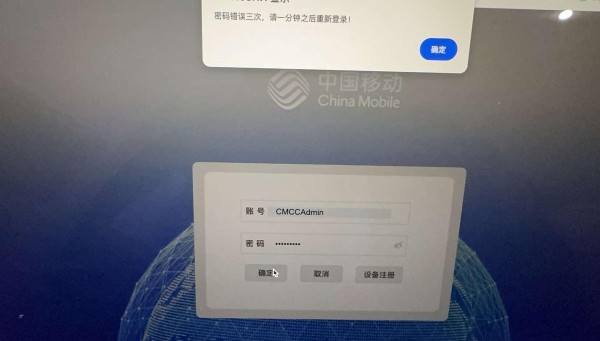
Method 2: search online
Search for “your modem model + superadmin password” Some models use a generic passwordMethod 3: try the initial password (fallback)
If the superadmin password does not work, try the initial password:aDm8H%MdA
A real case:
The author obtained the superadmin password but could never log in The technician confirmed over WeChat that the password was correct In the end the initial password worked The technician said “the modem may not have dialled, so it falls back to the initial password”> ? If the superadmin password is rejected, try the initial password
Steps (10 minutes total)
Step 1: back up the existing configuration (mandatory!)
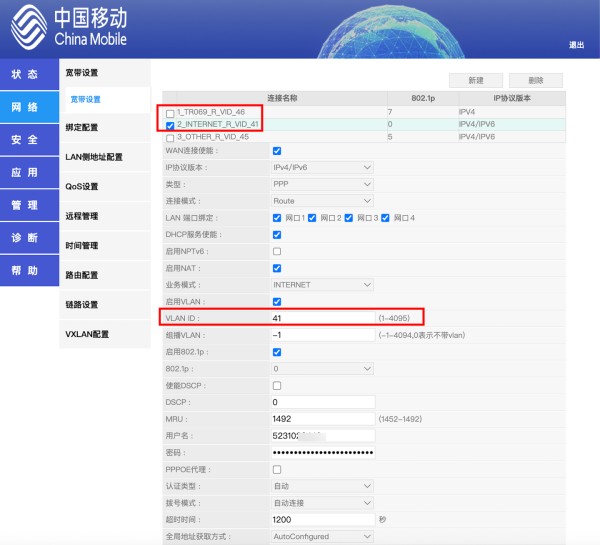
Once you are logged into the modem, open “Broadband settings” and find the default “Internet profile”.
What you must record:
VLAN ID (for example, 41) Dial-up username Dial-up password (usually 888888)Important:
✅ Screenshot every setting ✅ Write them down on paper or in your phone's notes ❌ Do not edit the original profile in place (your ISP may change it back remotely) ✅ Better to delete the original profile and create a new oneExtra suggestion:
Delete the TR069 remote management connection (so your ISP cannot manage the device remotely)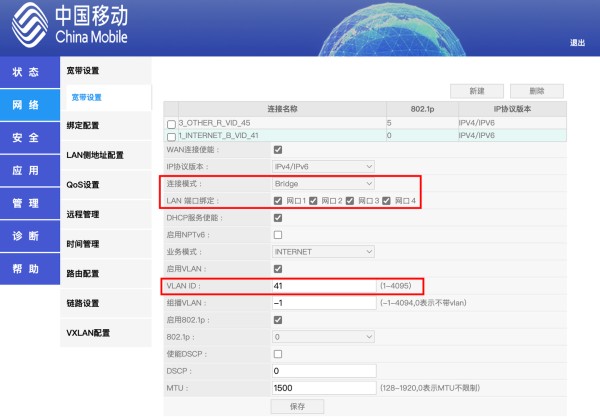
Step 2: create a new bridge profile
Click “New Internet profile” and fill in these settings:
| Parameter | Setting | Notes |
|---|---|---|
| Connection mode | Bridge | The key setting |
| LAN port selection | All ports, or just the ones you need | Depends on your setup |
| VLAN ID | The value you recorded earlier | Must be correct |
| Other parameters | Leave at default | No changes needed |
Procedure:
Choose “Bridge” mode Enter the VLAN ID Select the LAN ports Click “Save” Log out of the modem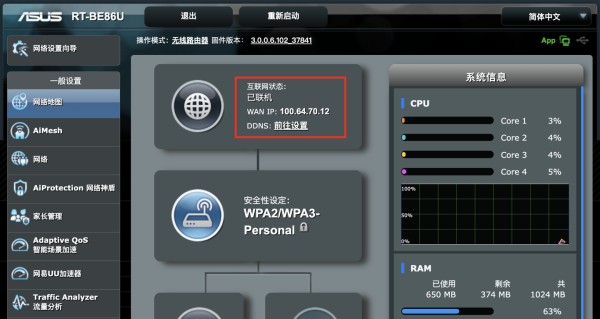
Step 3: configure dial-up on the router
3.1 Connect the cableONT LAN port ←→ Router WAN port 3.2 Router configuration Log in to the router (usually 192.168.0.1 or 192.168.1.1) Open “Internet settings” or “WAN settings” Choose “PPPoE” mode Enter the details you recorded: username password Click “Save” and wait for the dial-up to succeed 3.3 Verify it worked
Signs of success:
The router's WAN port receives an IP address from the ISP Usually a private address starting with 100 (such as 100.x.x.x) Or another public/private address assigned by the ISPIf dial-up fails:
Check that the username and password are correct Check that the VLAN ID is correct Restart the modem and the router Contact your ISP's support to confirm the account statusWhat changes after bridging
NAT type
ISP side: NAT1 (full cone, very open) After the router: usually NAT3 (port restricted)> ? To get NAT1 you need a router that supports Full Cone mode
Network performance
✅ Lower latency (one NAT layer removed) ✅ Better stability (no longer at the mercy of the modem) ✅ All router features usable ✅ Easier future tinkering (software routers, mesh networking, and so on)FAQ
Q1: What if I lose internet access after bridging?
Troubleshooting steps:
Check whether the router dialled successfully Check that the username and password are correct Check that the VLAN ID is correct Restart the modem and the router Restore the original configuration and start againQ2: IPTV stops working after bridging?
Solutions:
Configure a separate VLAN for IPTV Or keep the IPTV connection on the modem Ask your ISP for the exact configurationAdvanced: to let any device on the LAN (phone, computer, TV) watch IPTV without a set-top box, see NAS multicast-to-unicast: choosing between udpxy, msd_lite, and rtp2httpd.
Advanced: to push for more speed after bridging, try OpenWrt single-line multi-dial: bonding bandwidth with mwan3.
Q3: Will my ISP change it back to router mode remotely?
Likelihood:
If the TR069 connection remains, it may be reverted Deleting the TR069 connection is recommended Otherwise, check the configuration periodicallyQ4: Is bridging risky?
Risk assessment:
⚠️ A failed attempt can leave you without internet ✅ But the original configuration can be restored ✅ Screenshot and back up everything first ✅ Do not change settings you do not understandQ5: Can every optical modem be bridged?
Answer:
Most modems support bridge mode A few ISP-customised modems may restrict it You need the superadmin password to make changes Some regional ISPs may not permit itAbout the 38-yuan China Mobile broadband plan
What the plan includes
Price: 38 yuan/month Speed: gigabit broadband Extras: a router plus a 2.5G compact optical modem Contract: usually requires bundling a mobile planWho it suits
✅ Users on a budget ✅ Households without demanding speed needs ✅ Mostly everyday browsing and video ⚠️ Not ideal for gamers who care about latencySummary
The core value of bridging
One less NAT layer: better network efficiency Router in control: all features usable A more stable network: no longer dependent on the modem Easier tinkering: software routers, mesh networking, and so onDifficulty
⭐⭐⭐ Moderate About 10 minutes if you know what you are doing Beginners should read the guide first and prepare a backupFinal advice
Always back up the configuration before you start Do not change settings you do not understand If it fails, restore the original configuration Bridging your modem is “step one in playing with routers”Related guides:
Complete guide to upgrading NAT3 to NAT1 Roundup of NAT1-capable routers Online NAT type test IPv6 reachability statistics by Chinese province (updated hourly)网址:Bridge Your Optical Modem in 10 Minutes https://www.yuejiaxmz.com/news/view/1462854
相关内容
10 Most Spectacular Sights and Landmarks in Auckland – Top Attractions to VisitOrganize your kitchen cabinet in 5 simple steps.
Reset your PC
How to Safely Remove Gel Polish Without Damaging Your Nails
Let lifestyle habits optimize your life
Emotional management in high
Baking soda: the “cleaning little helper” in life
Site unavailable in your region
Find your files and apps in Windows
节约时间小妙招:10种方法让你今天节约10分钟
随便看看
最新动态分享
- 光猫改桥接后,一根网线搞定IPTV和上网的保姆级教程(附VLAN配置避坑点)
- Bridge Your Optical Modem in 10 Minutes
- 光猫IPTV路由模式,支持IPTV机顶盒盲插,电视上网和IPTV两不误
- 万兆光猫G7615AV5折腾指南:桥接、IPTV与避坑全解析
- 10个收纳整理小妙招,让家里空间翻倍,省钱又实用
- 如何选择便携洗漱包?五款大容量旅行收纳袋推荐,实用又方便
- 2026流行小妙招:提升生活效率的实用技巧
- 28 个冷门家庭小窍门!知道 10 个算厉害,看完化身家务高手
- 3 个小户型收纳窍门,巧用空间告别杂乱拥挤
- 懒人专属10个居家整理小窍门,不费力,家里天天清爽干净
热点动态分享
- 150139
- 59561
- 46955
- 43220
- 42568
- 31612
- 27551
- 25896
- 24284
- 21067