Android 4.0 Launcher2源码分析——主布局文件
分析文学作品结构,提升布局技巧 #生活乐趣# #阅读乐趣# #文学创作指导#
本文来自http://blog.csdn.net/chenshaoyang0011 转载请申明文章出处!
Android系统的一大特色是它拥有的桌面通知系统,不同于IOS的桌面管理,Android有一个桌面系统用于管理和展示APP以及桌面Widget等。Android提供一个默认的桌面应
用,当然我们也可以使用第三方的桌面应用。Android的Launcher的源码在 \packages\apps\Launcher2。Launcher2的主布局文件包括res\layout-land\launcher.xml
, res\layout-port\launcher.xml , res\layout-sw600dp\launcher.xml ,分别适配横屏,竖屏和7寸平板。内容大同小异,这里就以res\layout-port\launcher.xml的为例。
首先让我们看看launcher.xml中的结构:
<com.android.launcher2.DragLayer
xmlns:android="http://schemas.android.com/apk/res/android"
xmlns:launcher="http://schemas.android.com/apk/res/com.android.launcher"
android:id="@+id/drag_layer"
...
>
<include
android:id="@+id/dock_divider"
layout="@layout/workspace_divider"
...
/>
<include
android:id="@+id/paged_view_indicator"
layout="@layout/scroll_indicator"
...
/>
<com.android.launcher2.Workspace
android:id="@+id/workspace"
...
>
<include android:id="@+id/cell1" layout="@layout/workspace_screen" />
<include android:id="@+id/cell2" layout="@layout/workspace_screen" />
<include android:id="@+id/cell3" layout="@layout/workspace_screen" />
<include android:id="@+id/cell4" layout="@layout/workspace_screen" />
<include android:id="@+id/cell5" layout="@layout/workspace_screen" />
</com.android.launcher2.Workspace>
<include
android:id="@+id/qsb_bar"
layout="@layout/qsb_bar" />
<include layout="@layout/apps_customize_pane"
android:id="@+id/apps_customize_pane"
..
/>
<include layout="@layout/hotseat"
android:id="@+id/hotseat"
..
/>
<include layout="@layout/workspace_cling"
android:id="@+id/workspace_cling"
...
/>
<include layout="@layout/folder_cling"
android:id="@+id/folder_cling"
...
/>
</com.android.launcher2.DragLayer>
html
接着我们来一一认识每一个View控件。
1、最外层的DragLayer,是一个继承自FramLayout的View控件,显示的就是整个桌面根容器。桌面的所有控件都是位于DragLayer中。
2、id/dock_divider,使用了布局workspace_divider,其实就是一个ImageView。是Workspace与Hotseat之间的分割线。
3、id/paged_view_indicator,使用了布局scroll_indicator,显示效果是在id/dock_divider上显示一条淡蓝色的横线,来指示当分屏所处的位置
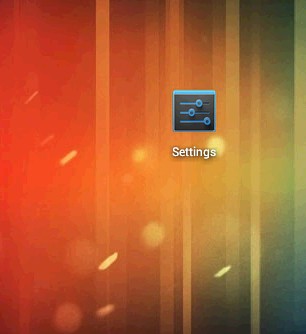
4、id/workspace ,工作空间拥有五个workspace_screen,即有五个分屏,每个分屏都可以放置shortcut和AppWidget,效果如下:
5、id/cell1..cell5 ,分别代表五个分屏
6、id/qsb_bar 搜索框/删除框,根据需要进行切换


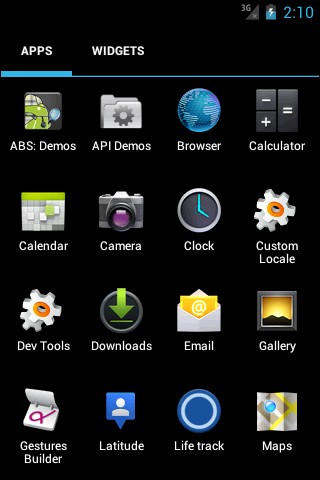
7、id/apps_customize_pane,效果如下
8、id/hotseat 即主屏幕下方的五个快捷位置

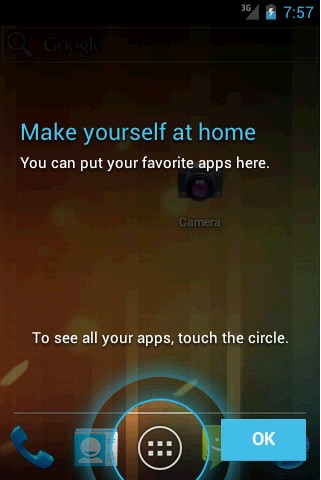
9、id/workspace_cling当第一次运行Launcher2时,会显示的用于指导的动画,以后不再显示
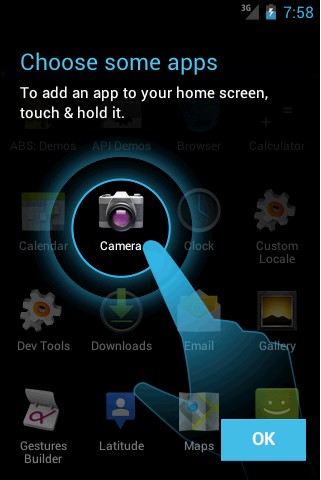
10、id/folder_cling,第一次使用Folder时,展示给用户的指导画面。
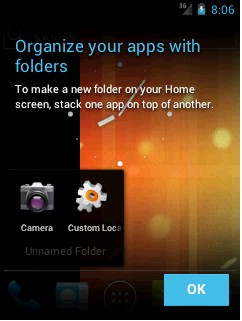
这样,我们已经可以使每个UI界面及组件都对号入座,这会使接下来分析的时候更加清晰。
网址:Android 4.0 Launcher2源码分析——主布局文件 https://www.yuejiaxmz.com/news/view/1421232
相关内容
Android日程管理软件源码免费分享android开发一款天气app附源码
Android手环App深度体验:蓝牙4.0健康管理助手
[源码和报告分享]基于Android
Android国际化资源文件自动化生成工具 android 资源
基于Android的家庭医务助手APP [Android]—计算机毕业设计源码+文档
基于安卓Android的健康饮食系统APP(源码+文档+部署+讲解)
Android与JavaEE结合的旧物交易平台源码分享
Android健康饮食管理系统APP开发教程与源码
能源能耗分析平台(源码+文档+部署+讲解)
随便看看
最新动态分享
- 旧物改造小技巧,家里闲置物品变宝贝,省钱又实用
- 抖音低成本赛道:旧物改造的成就感拍法
- 应用文写作
- “旧物焕新颜 创意筑青春”旧物改造创意活动
- 青塔街道组织开展垃圾分类主题旧物改造活动
- 旧物焕新生,校园传温情——我院青年志愿者协会开展旧物焕新活动
- 【劳动教育周】“巧手焕新,旧物重生”旧物改造
- 闲置旧物改造焕新颜,巧手改造解锁低成本居家生活小美好
- 这些创意旧物改造真的太实用太治愈了 今日分享旧物改造合集.网大家的生活更有温度....
- 旧书当废品卖 能否循环利用起来
热点动态分享
- 146832
- 57937
- 46395
- 43028
- 42178
- 31385
- 27087
- 25771
- 23627
- 20313